Who said what, and when.
Native transcription with speaker diarization, on Mac, iPhone and iPad. Drop in an interview or share a voice memo, and get a timestamped transcript that knows who was talking — on the Neural Engine, no account, no upload, no per-minute meter.
A reading room, not a waiting room.
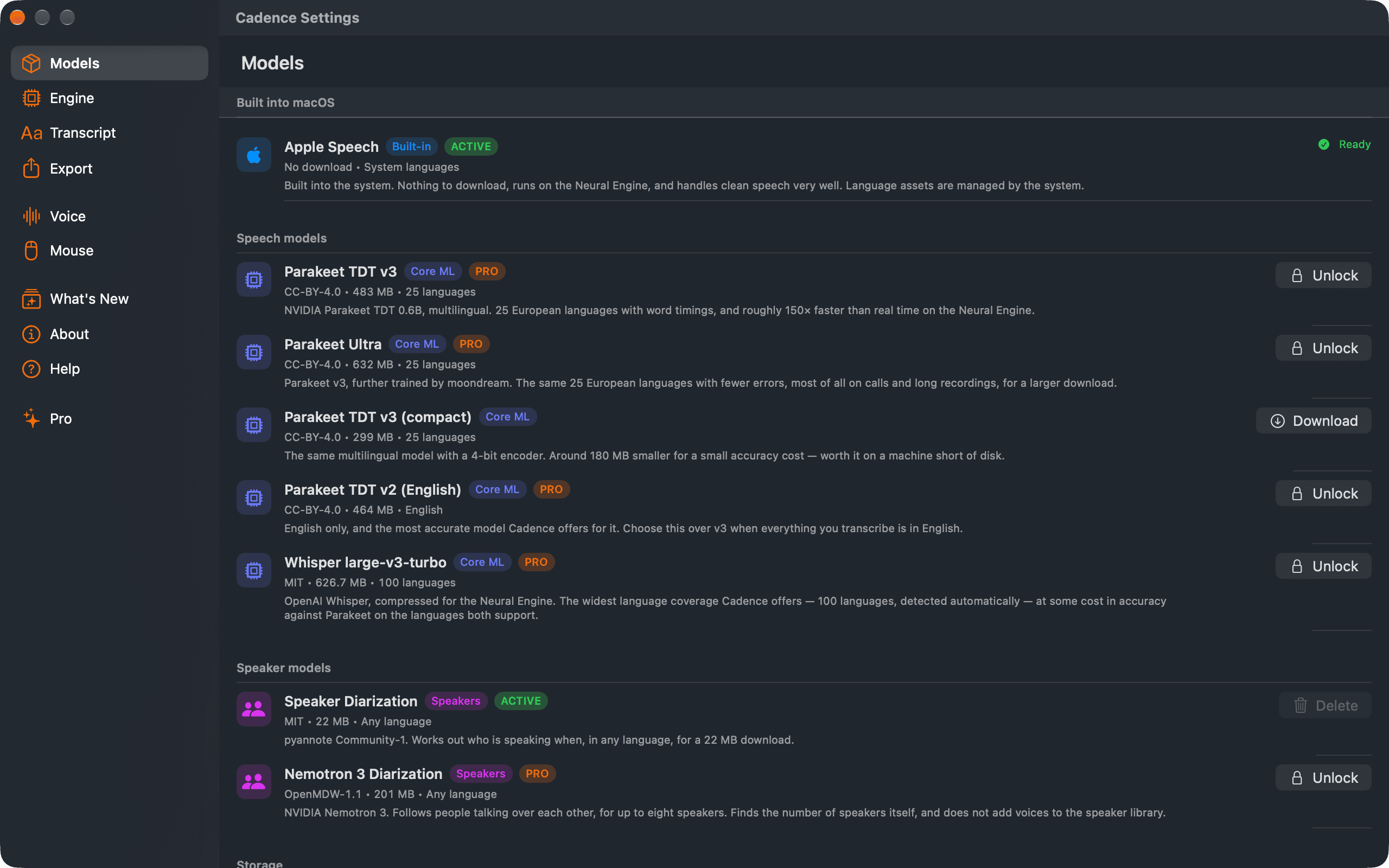
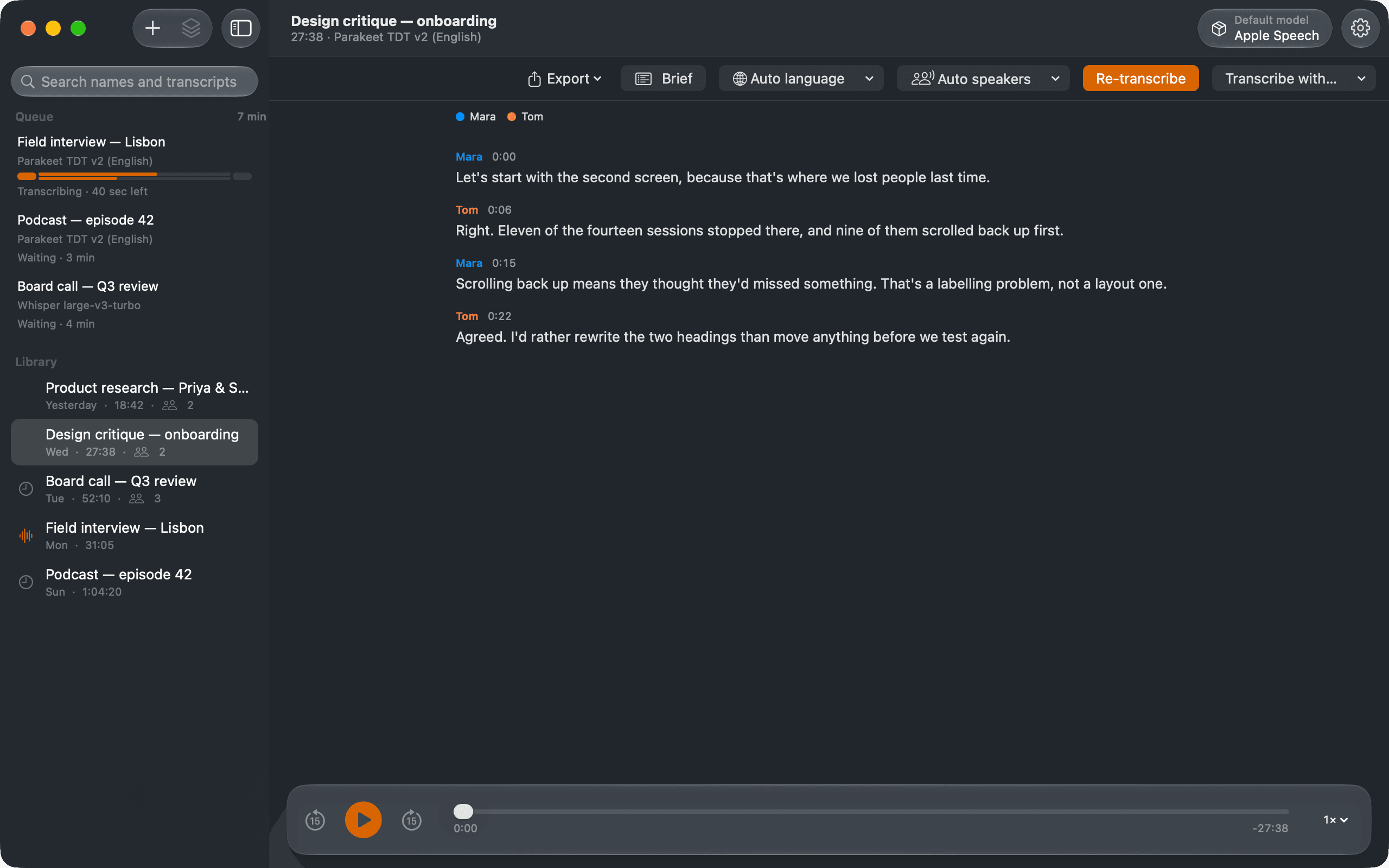
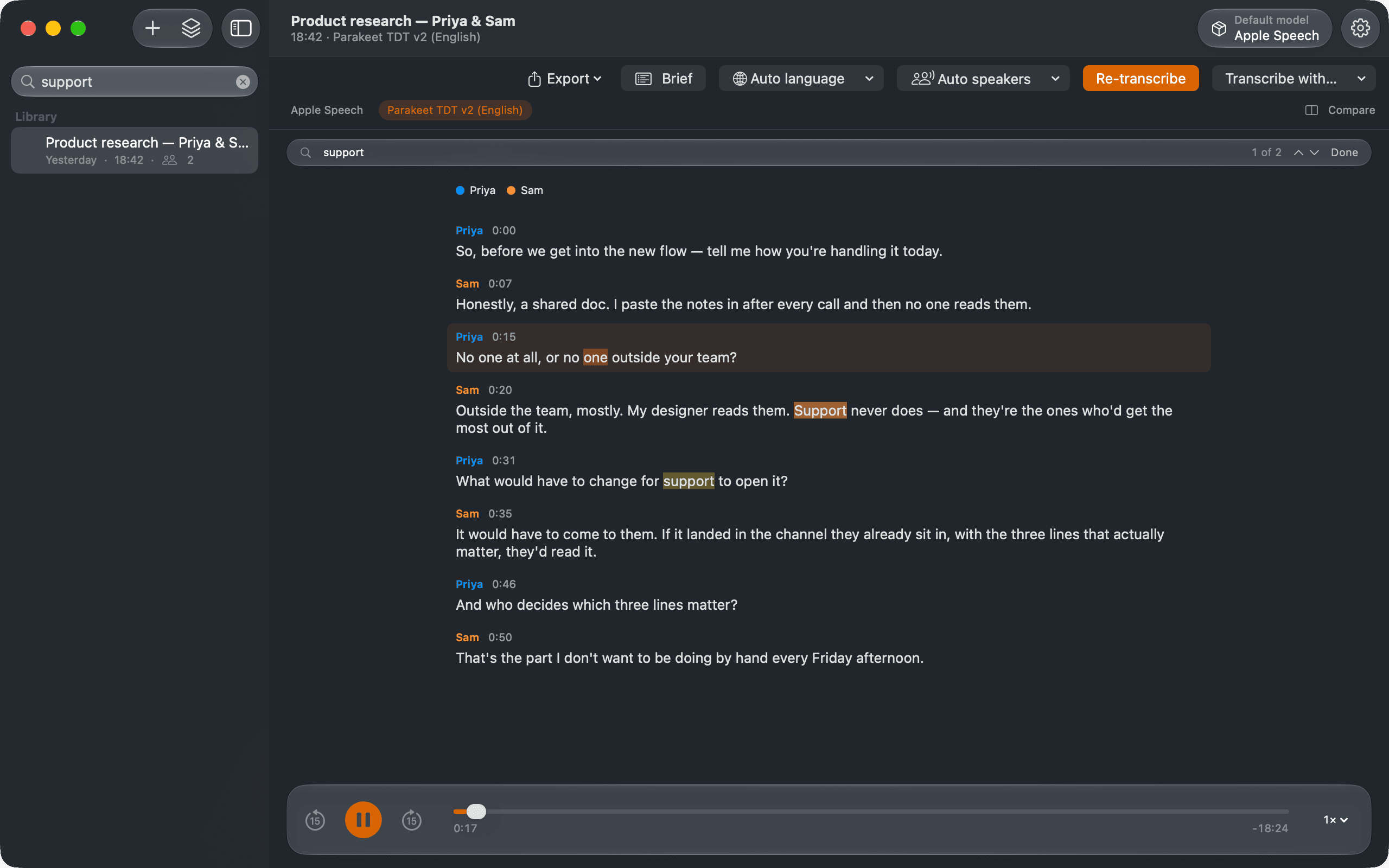
Drop a file in the library, pick an engine, and the transcript builds while you keep working. Play it back and the transcript follows along, word by word. Five screens, one at a time: the library, the engine manager, the queue with its parallel lanes, a search that lands on the line, and the side-by-side comparison of two engines on the same recording.
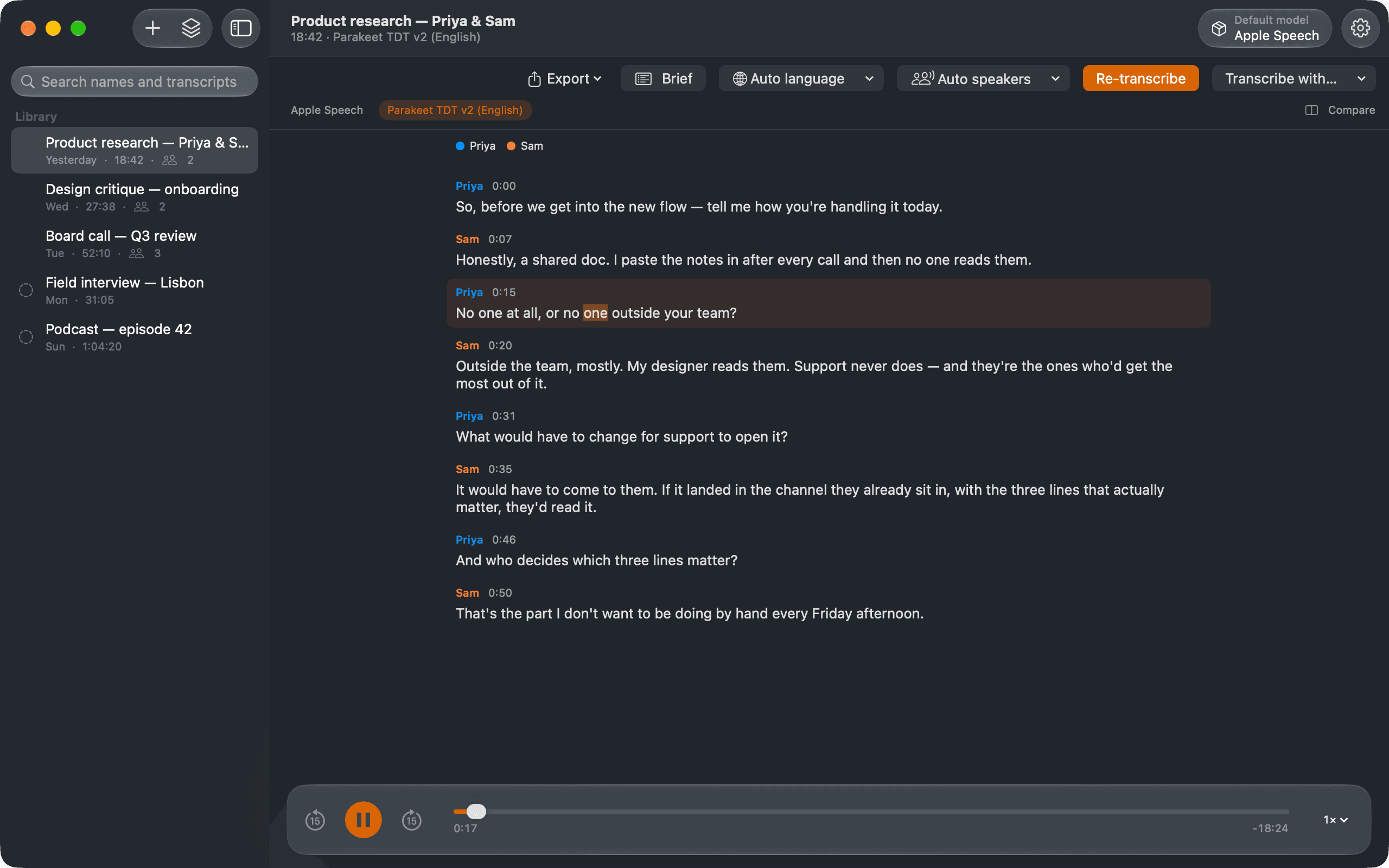
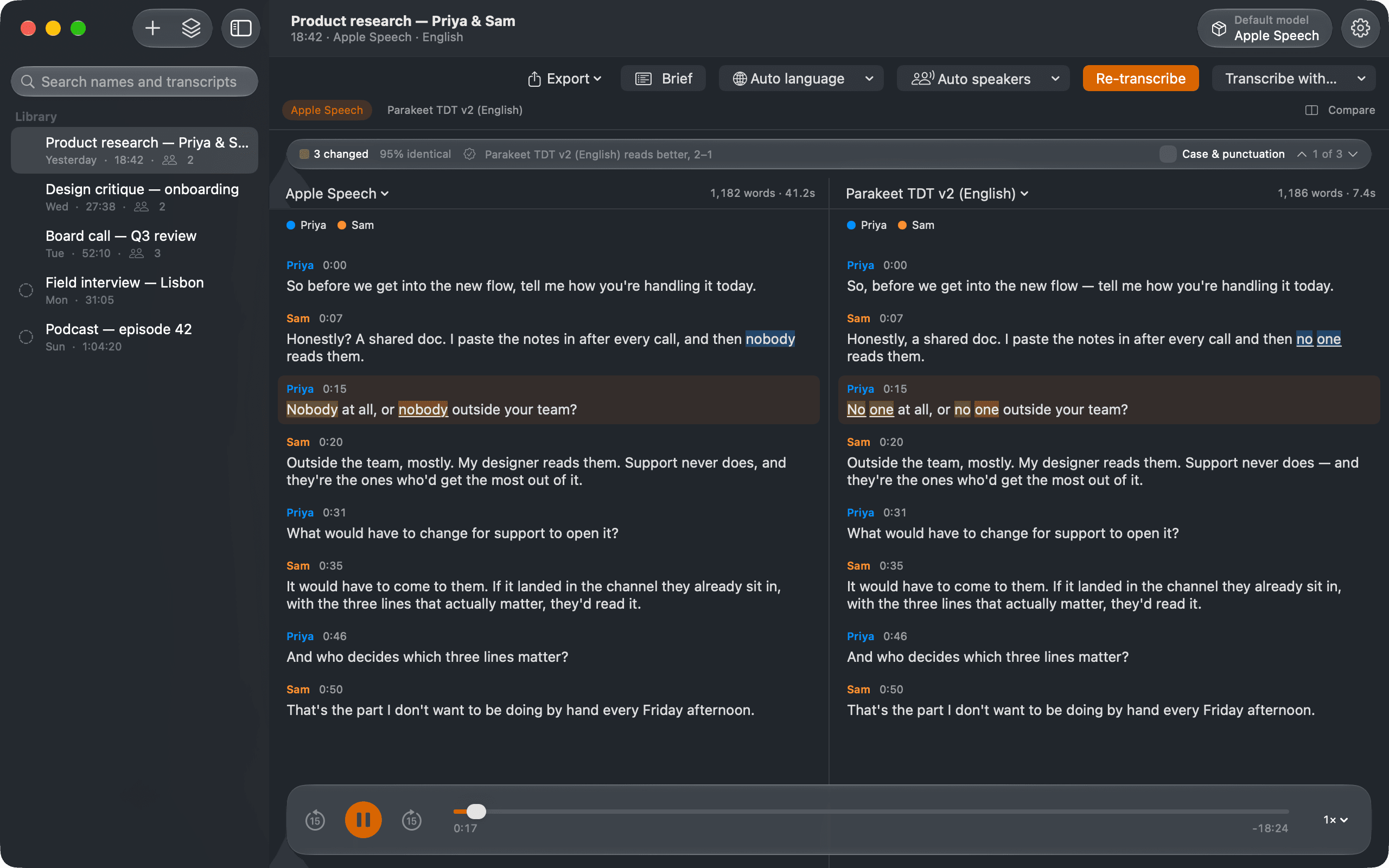
“Parakeet does the hour in under a minute on Apple Silicon and the speaker split is right most of the time … Nothing leaves the Mac, which is the only reason I could run those recordings through anything at all.”
Tell it what you care about.
Accuracy, download size and language coverage pull against each other, and no single engine wins all three. Cadence ships six and lets you switch per recording — each engine keeps its own transcript, so nothing is overwritten when you change your mind. Apple Speech and Parakeet v3 compact are free and unlimited; the four full-size models come with Pro.
Built into macOS and iOS. Transcribes on first launch with nothing to fetch, in whichever locales the system already has.
The most accurate engine Cadence ships. English only — reach for v3 or Whisper if the recording isn't.
Nearly v2's accuracy across 25 European languages. The default choice for multilingual European work.
v3, further trained by moondream. Fewer errors in all 25 languages, and in our tests it never dropped a passage of a long recording.
Two thirds the download of full v3 with the same language set. The sensible middle when disk is the constraint.
For recordings in something Parakeet never saw. It detects the language itself — nothing to configure.
Apple Speech has no language count on purpose: it transcribes whichever locales the system has downloaded, you can add more in the system's settings, and the set changes under the app. Cadence asks the system at launch rather than printing a number that goes stale.
Parakeet TDT 0.6B — NVIDIA, Core ML conversion by FluidInference (CC-BY-4.0) · Parakeet Ultra — moondream, trained from Parakeet TDT 0.6B v3 by NVIDIA, Core ML conversion by FluidInference (CC-BY-4.0) · Whisper large-v3-turbo — OpenAI, Core ML conversion by Argmax (MIT) · pyannote Community-1 — pyannote, WeSpeaker and BUT Speech@FIT, modified Core ML conversion by FluidInference (CC-BY-4.0) · Nemotron 3 Diarization — NVIDIA, Core ML conversion by FluidInference (OpenMDW-1.1)
Turn-taking is the subject.
Cadence separates the voices before it writes anything down, so the transcript arrives already attributed. 10.6% diarization error rate, 22 MB, any language — and it is part of the free app, not a paywalled extra. Pro adds a second speaker model, NVIDIA's Nemotron 3, which follows people talking over each other, for up to eight speakers.
Every other transcriber wants your audio. This one wants 22 MB.
The only network request Cadence ever makes is fetching the engine you chose, from Hugging Face, once. After that it works on a plane, on a locked-down network, and with a recording you are contractually not allowed to hand to anybody's cloud.
One app, three screens.
The same engines, the same speaker separation and the same transcripts, each running entirely on the device in your hand. The Mac does the most, the iPad most of that, and the iPhone the core. Each keeps its own library: nothing syncs between them, because nothing leaves the device. One Pro purchase unlocks all three.
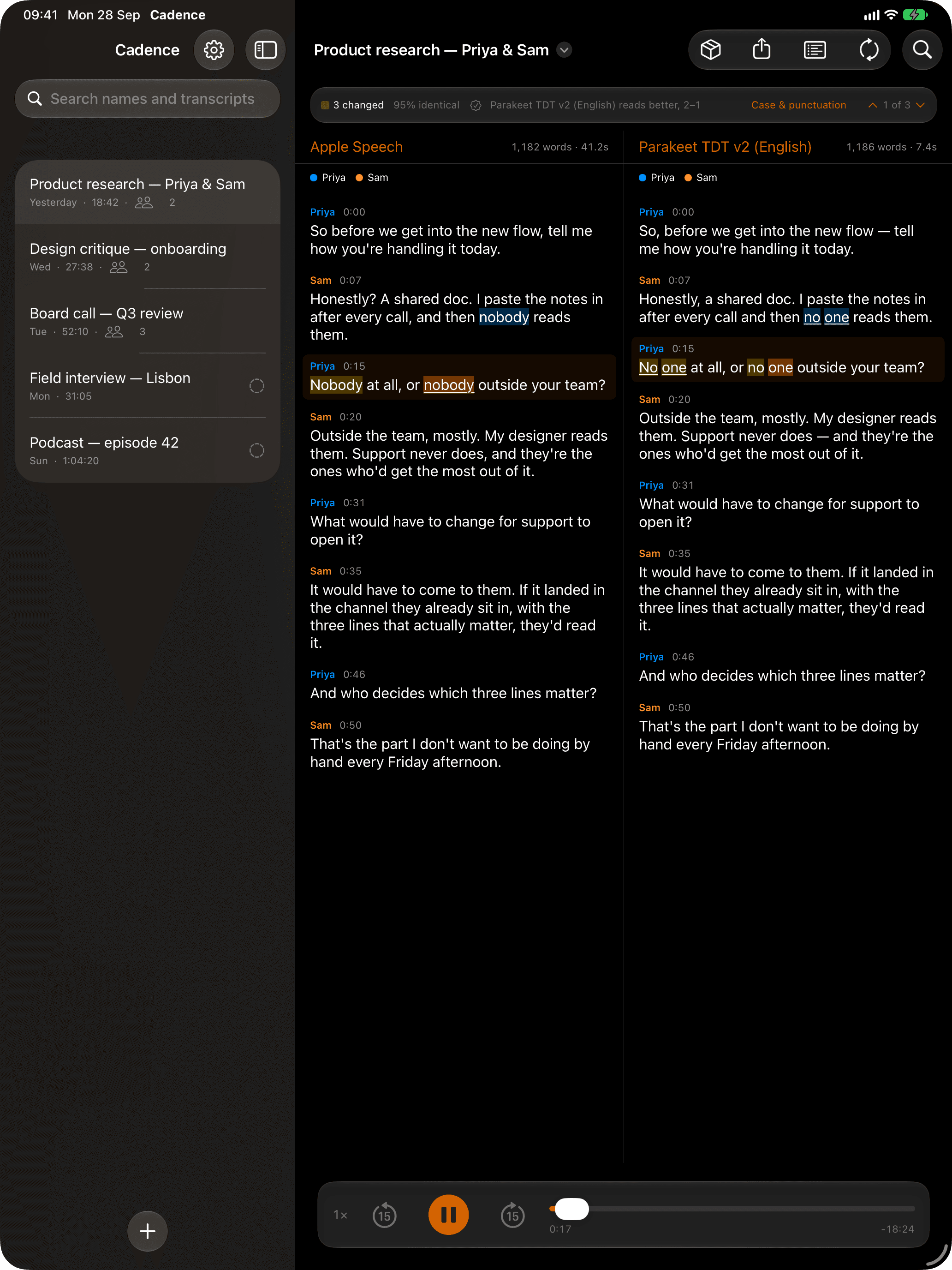
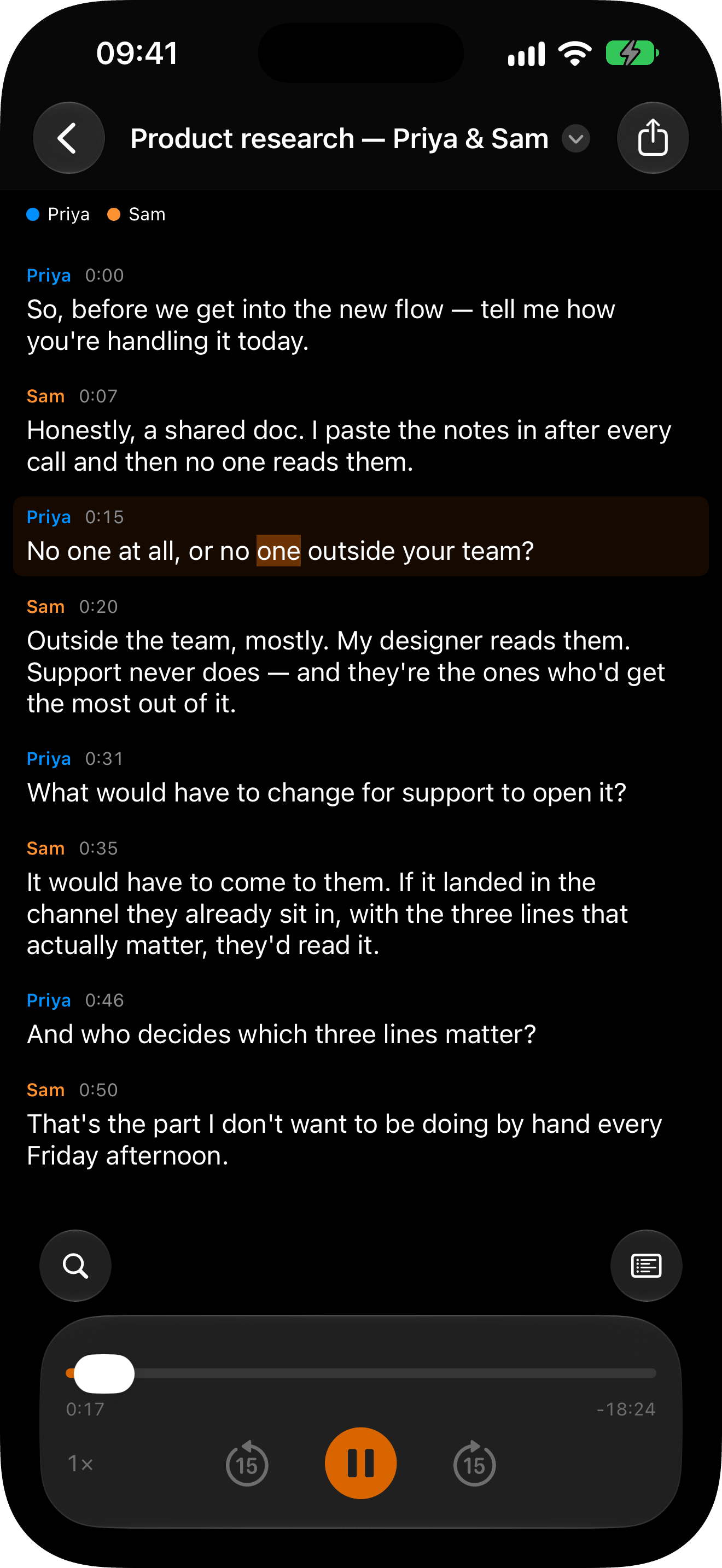
| Feature | Mac | iPad | iPhone |
|---|---|---|---|
| Apple Speech and Parakeet v3 compact | Included, free | Included, free | Included, free |
| Full-size Parakeet and Whisper | Included with Pro | Included with Pro | Included with Pro |
| Speakers identified, and renamed | Included, free | Included, free | Included, free |
| Speaker library, across recordings | Included with Pro | Included with Pro | Included with Pro |
| Nemotron, for overlapping speech | Included with Pro | Included with Pro | Included with Pro |
| Playback that follows the words | Included, free | Included, free | Included, free |
| Search names and transcripts | Included, free | Included, free | Included, free |
| Send recordings in from other apps | Included, free | Included, free | Included, free |
| Several recordings queued at once | Included with Pro | Included with Pro | Included with Pro |
| Recording groups | Included with Pro | Included with Pro | Included with Pro |
| Drag files in from other apps | Included, free | Included, free | Not on this device |
| TXT, SRT and clipboard export | Included, free | Included, free | Included, free |
| WebVTT, Markdown, JSON and CSV | Included with Pro | Included with Pro | Included with Pro |
| Briefs, and one-turn summaries | Included with Pro | Included with Pro | Included with Pro |
| Model comparison | Included with Pro | Included with Pro | Not on this device |
| Transcribe All | Included with Pro | Not on this device | Not on this device |
| Dictation into any app | Included with Pro | Not on this device | Not on this device |
✓ free · PRO with the one-time upgrade · — not on that device. The Mac needs Apple Silicon; iPad and iPhone need iPadOS or iOS 26. Briefs, and the verdict inside model comparison, need Apple Intelligence.
Pay once. Own the tool.
No subscription, no seats, no minutes. The free app is a complete transcriber — two engines, whole files, unlimited, speakers included. Pro adds the models that squeeze out the last of the accuracy, and the tools for thirty recordings instead of one.
A whole transcriber, not a trial. No watermark, no time limit, no sign-up.
Early launch price through 1.x, rising to $29.99 at 2.0
One purchase covers Mac, iPhone and iPad · what each can do
Full-precision Parakeet and Whisper, Nemotron 3 for people talking over each other, plus the tools for a backlog rather than a file. Queue the library, sort it into groups, let it recognize the people you have named, compare engines, export in whatever format your pipeline eats, and on the Mac, dictate into any app.
Questions, answered.
The ones that come up most. If yours isn't here, write to us.
Do I need an internet connection?
Only to install the app, to download an engine the first time you pick one, and to fetch the 22 MB speaker model the first time you transcribe with speaker labels on, as they are by default. The default engine is already built into macOS and iOS, so a fresh install transcribes with no engine to download; without a connection, a recording is transcribed without speaker labels until the speaker model is in.
What does it run on?
macOS 26 or later, on an Apple Silicon Mac: Cadence has been an arm64-only build since 1.2.0. Within that, the downloadable engines run on the Neural Engine and Apple's built-in engine runs on any Mac the app installs on. Cadence is also on iPhone and iPad with iOS 26 or later, and one Pro purchase covers all three.
Can I use it on confidential recordings?
That is the reason it exists. Nothing is uploaded, so there is no processor to add to a DPA and no terms of service quietly reserving the right to train on your interviews.
Does Cadence record?
No. Transcription reads files you already have — audio or video, opened, shared or dropped in. Keep recording with whatever you record with. The one time Cadence opens the microphone is dictation on the Mac, and only while you dictate: the words are typed where your cursor is, and the audio is never saved or sent anywhere.
What is actually in Pro?
On the Mac, eight things: the full-size models — Parakeet TDT v3 at full precision, Parakeet Ultra, the English-tuned v2 and Whisper large-v3-turbo, plus Nemotron 3, a second speaker model that follows people talking over each other; Transcribe All, which works through every untranscribed recording in the library one at a time; briefs, which summarize a transcript into decisions, action items and open questions, or a single long turn into a few sentences; the speaker library, which offers to recognize the people you have named in your other recordings and names nobody until you confirm; model comparison, which runs one recording through several engines in a single action, shows two of them side by side and has the on-device model judge which one read each disagreement correctly; recording groups, which sort the library into sections such as Clients or Podcast; dictation into any app, which types what you say wherever your cursor is, from a keyboard shortcut or a mouse button; and the full export set — WebVTT, Markdown, JSON and CSV, with their options. On iPad, Pro adds the full-size models, queueing several recordings at once, briefs, the speaker library, model comparison, recording groups and the full export set. On iPhone it adds the same except model comparison, and one purchase covers all three.
Can Cadence type what I say into other apps?
On the Mac, with Cadence Pro. Press a shortcut, speak, and Cadence types the words wherever your cursor is: hold it while you talk and let go, or press it once and it inserts when you pause. A second shortcut dictates and then presses Return, for a chat or a terminal prompt, and saying "slash commit" types /commit. A mouse button can do either. Speech is recognized on your Mac, by Parakeet TDT v3 when it is downloaded and Apple Speech otherwise. To type for you, Cadence needs permission under Accessibility; without it, the text is copied and you press ⌘V. Dictation is off until you switch it on in Settings ▸ Voice.
What do briefs need?
They run on Apple's on-device model, so they need Apple Intelligence, and nothing is uploaded to produce one. That model reads 15 languages, against the 25 Cadence transcribes free and the 100 Whisper handles — where it cannot read a transcript, Cadence says so rather than offering a button that fails, and it checks that before it checks whether you have Pro. It also declines the occasional passage; those are listed with their timestamps instead of being quietly dropped, so a partial brief tells you it is partial.
What can the free app actually do?
Transcribe as much as you like on two engines: Apple Speech, built into macOS and iOS, and Parakeet TDT v3 compact, a 299 MB download covering 25 European languages. Whole files, not samples, with the speakers identified, playback that follows the words, search, and export to plain text, SRT and the clipboard. No trial timer, no watermark, no account, and no cap on minutes. Pro adds the full-size models and the tools for working through a backlog.
Why is speaker identification free when it downloads a model?
Because it is what the app is for. Diarization is a 22 MB download that adds to whichever engine you are using rather than replacing it, so the free tier produces speaker-attributed turns rather than a wall of text. Parakeet v3 compact is free for a related reason: with only one free engine you could never have two models installed, so model comparison would be a feature we sell that you could never try.
What's coming next?
Shortcuts actions; a model remembered per recording; and editing the transcript text itself. None of it ships today, though each recording already keeps its own language, speaker count and speaker separation, free — listed because it's where Cadence is going. Search and speaker renaming used to be on this list and now ship, both free, and so does the speaker library, which recognizes the same voices between recordings, with Pro.
Batch background removal for Mac, with marketplace presets, real edge control and readiness checks before you upload.
Prompt-driven image segmentation with COCO, YOLO and per-frame video masks. Dataset-ready, entirely on-device.
Who said what, and when. On your own devices.
Free forever on two engines, 25 European languages included, speakers identified. Unlock full-size Parakeet, Whisper and the backlog with a one-time Pro upgrade, and one purchase covers your Mac, iPhone and iPad.